top of page

Savviest: Career coach dashboard
UX DESIGN l UI DESIGN l RESEARCH

INTRODUCTION
Savviest is an AI-augmented career coaching marketplace that gives job seekers superpowers and helps career coaches grow their businesses. Savviest offers services like resume builder and job tracking. Recently, they've decided they want to make a platform that offers a direct career coaching system, which includes a coaching dashboard and coaching tools.
MY ROLE
-
Conducting initial research
-
Creating wireframes and clickable prototypes
-
Completing usability testings and iterating designs
MY TEAM
-
Team of 4 designers
-
1 lead designer
-
Team of 2 developers
TIMELINE
Nov 2021 - Jan 2022
The Problem
The workflow of career coaches is inefficient and time-consuming because they use different platforms to carry out operations like scheduling meetings, communicating, and much more.
The Challenges
Career coaches outside of the Savviest platform must juggle significant numbers of disparate tools when working with their clients. They use separate platforms for scheduling meetings, communicating, sharing resources, working with their client, tracking their progress, and more. This is inefficient for the coach, who must spend their time bouncing between platforms, and frustrating for the client, who often needs to be reminded on which platform a particular resource or activity is located.
The Solution
Savviest aims to become the centralized platform for coaches and their clients to collaborate. Job seekers already have an abundance of tools on the Savviest platform to manage their job search independently, but don’t have a way to work directly with their coaches. Coaches don’t have a way in Savviest to guide their clients through the job search process, share resources, or track their progress. By creating a workspace that coaches can complete multiple works at one place without moving back and forth, users will be able to solve their problems.
Our mission
We are going to make the best workspace software for career coaches.
Competitive Analysis
I conducted research on competitors to learn from competitors and look at what problems they solved and what solutions were offered to users.: Jobscan, Quenza, BetterUp and placement.
I realized all of the tools and coaching marketplaces were client-focused, making the main users, job seekers, not career coaches. What competitors offer, is the ability to help job seekers tailor their resumes, cover letters, and find career coaches. However, there’s no workplace for career coaches to do their work. Therefore, our team decided to create a platform that focuses on career coaches as users and fulfill their needs.

User Interview
Our team interviewed a total of 6 career coaches; 3 independent coaches and 3 boot camp coaches. I was responsible for interviewing 3 independent coaches. The goal from interviewing career coaches was to gain a better understanding of what tools they use to work with clients, what the workflow looks like, and the obstacles they face which could become opportunities for improvement.
They all had backgrounds in other industries and transitioned into career coaching.
Tools that career coaches are using are quite similar. They mainly use scheduling tools, video call, google folder and messaging tools.
Coaches complain people often change their schedules and don’t often think coaches' time is valuable.
A long term tool to share documents with their clients would be needed.
Integration is the key. They want to do work at one place - customer accounts, take notes, and extra tools.
Having a one stop shop resource library would be a good idea.


James, 45
Lisa, 38
Mimi, 33
51, Nadar
35, Jennifer
48, Chris
User Persona
From previous research, I've come to the persona Molly to understand our users better.

HMW Statement
-
How might we help users work efficiently?
-
How might we integrate coaching tools into one place?
-
How might we understand how users share/store information?
Affinity Map
Different colors of the post-its represent different coaches. At first, our team wrote down all the information we received from the interviews and categorized them by topics.
Many coaches emphasized communication, sharing/storing feedback and organization as important in their workflow and more features would be needed to support those. Also, they wished to have finding and sharing resources features available for clients.


Sitemap
Based on the affinity map, I made a sitemap to determine MVP. From several meetings with developers and the lead designer, our team came to the conclusion that the client list and resource library are the most necessary features for career coaches, and decided to create them for our first launch.

Lo-fi Design
Then, we divided into two teams, with two designers focusing on the client list and two designers focusing on the resource library. I was on the team responsible for designing the resource library. We sketched screens and made wireframes afterward. We focused on designing the main resource library page, uploading new resource pages, and sharing resource pages.


Main page
Uploading new resource

Sharing resource
Usability Test
Even though our team designed the two features separately, we conducted usability tests for both the client list and resource library prototype together, since they are all going into the coach dashboard. I recruited 4 career coaches that we had interviewed before and tested them via Zoom. Following are the findings of the resource library from the usability tests.


.png)
1. We received the comment that the header of the second navigation bar seemed like it had been selected because the green color is CTA, so we changed the action color, green, to the secondary color, purple, to remove any confusion.
2. The filter function was not loved by users and brought them confusion, because topics already existed on the second navigation bar. When users noticed the topics on the filter again, they didn't know what to do. Therefore, we removed the filter and made resource type tags instead.
3. The term ‘most popular’ was ambiguous because users didn't know if it’s most saved or most shared, so we changed it to ‘most shared’ which indicates most shared by the savviest coaches.
4. The uploading resource button was invisible. Coaches tended to not find the button right away, so we moved the button to the top of the page with the text indicator.


1. Users were confused by the term ‘make public’. The question we received was “Am I uploading this to all coaches or my clients?”. So we changed ‘make public’ to ‘share to savviest community’ to avoid any confusion.
2. Users misunderstood the term ‘date created’. They thought the date they input would be the date the resource was uploaded. However, the reason we added a ‘date created’ box was to notify users when the original resource was created, so users know how old the resource is when they read it. Coaches mentioned that they wouldn’t upload old resources, or if they needed to, they would update to the newer version. So we decided to remove the ‘date created’ box and make the resource have a 'today’s date' automatically show when coaches upload it.


1. We realized that coaches didn’t need to write down the subject when they shared the resource, but they wanted to write a short note to inform their clients what the resource was about and why they were sharing it, so we got rid of the subject and added a note section instead.
Hi-Fi Design

Coaching Dashboard
Coaching dashboard offers 4 main functions such as today's schedule, coach action item, client placement status, and client list.
Resource Library
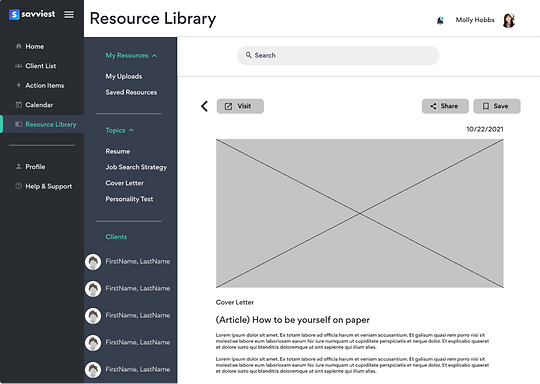
Resource library helps career coaches share resources with their clients. Users can search resources by topics and types. Users can also share the resource with their clients using 'drag and drop' function. When they drag the resource and drop it to the client's name, a confirmation message pops up.


Resource view & Share Resource
When users click the resource, it will show the preview of the resource. This page offers save and share functions. By clicking the share button, users will be able to share the resource with multiple clients with a private note.


Add Resource
Users are able to add new resources to Savviest resource library. When coaches upload the resource, they can choose to share it to Savviest community or keep it private.

Reflection
Overall, my experience with Savviest was really pleasant. Savviest was very appreciative of our product and satisfied with the result. Working with other designers allowed me to see the things I couldn’t see if I were alone. I especially enjoyed working with developers. It was very interesting discussing what is feasible and what is not in development sense, so it helped me cope with reality and change my plan before getting in too deep. Communicating with a lot of people is not easy, but I can confidently say that I’ve learned how to approach problems and find proper solutions by understanding users. I have grown with this project and learned so many precious things.
Next Step
-
I would love to do another round of usability tests with the product when it is launched and see how users interact with it.
-
I would like to check how users are using the drag and drop function to share the resource to their clients. I realized that users tend to not to notice the function until we tell them, so it would be the next thing I would test.
-
I would also like to check if users love all features and widgets on the client view and add customization function so coaches can customize their dashboard.

bottom of page